 Nyxo
NyxoFree · No sign-up · Full resolution
Change the background of any photo
Keep the person or product exactly as it is and put it somewhere new, with light and shadows that match the new scene.
Change a background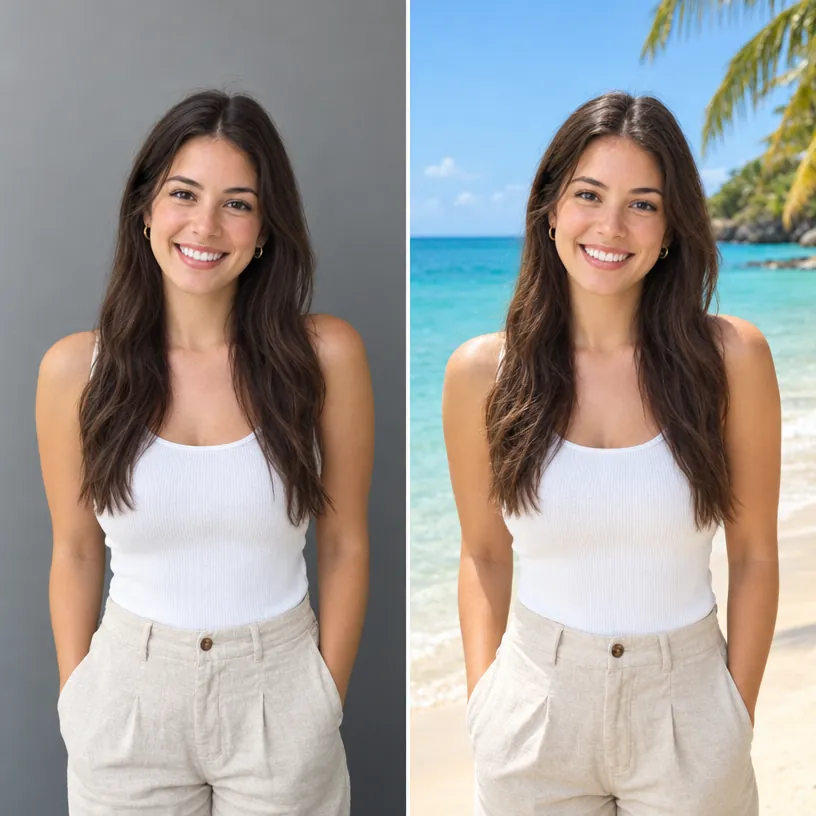
How it works
- Upload your photo.
- Pick a new background, or upload your own.
- Click Create and compare before and after.
Why use Nyxo Change Background
- 12 backgrounds, from studio gray to outer space, plus a blur option.
- Use any picture as your own background.
- Run it on up to 10 photos at once.
- Free, with no sign-up and no watermark.
- Full-resolution results at the highest quality.
- Private: your pictures stay in your browser unless you share them.
- Works on phones, tablets and computers.
Questions
Will the person change?
No. Faces, clothes and poses stay the same; only the background changes.
Can I just blur the background?
Yes. Choose "Blur the background" for a portrait-mode look.
More free tools
AI Image GeneratorBackground RemoverObject RemoverImage UpscalerPhoto RestorationAI Product PhotosAI Headshots & AvatarsMockup GeneratorVirtual Try-OnAI Interior DesignPoster & Thumbnail MakerResize for All PlatformsSticker MakerChange Text in ImageChange Light & SeasonSketch to ImageColorize PhotoColoring Page MakerHairstyle Try-OnHouse & Garden DesignTattoo GeneratorImage ExpanderImage to PromptPhone Wallpaper MakerInstagram Carousel Maker