 Nyxo
NyxoClaude Opus 5.5
Anthropic’s strongest model. Great for hard coding tasks, big projects and careful reasoning.
/model claude-opus-5.5Use Claude Opus 5.5, Claude Sonnet 5.5, GPT-6 Astra and Gemini 4 Argon in Claude Code, VS Code and OpenCode with one prepaid or monthly key. Pay in USDT, log in with one command, and pay up to 83% less.
Under two minutes: get your key, log in with one command, and switch models.
Pick how much usage you want. The bigger the amount, the bigger the discount.
Send the exact amount to the address of your order, on BNB Smart Chain (BEP20).
Your key appears on the payment page as soon as the payment is confirmed.
Run one command on Windows, Mac or Linux and paste your key. Claude Code and VS Code are ready.
Your balance is spent at each model’s list price per token. You pay up to 83% less for it.
Choose prepaid credit on any plan, or monthly access on Pro, Max and Ultra at the same purchase price.
Monthly access lasts 30 days. Your daily allowance resets every 24 hours from activation, with no rollover. Renew manually in USDT; no automatic billing. Prepaid and monthly access use separate keys.
Token estimates assume typical coding use. Each model estimate is an alternative, not an additional allowance. Actual usage varies.
Use any of them with the same key and switch whenever you like.
Anthropic’s strongest model. Great for hard coding tasks, big projects and careful reasoning.
/model claude-opus-5.5A versatile model for everyday coding, writing and analysis.
/model claude-sonnet-5.5OpenAI’s flagship model. Fast, detailed answers for code, analysis and writing.
/model gpt-6-astraGoogle’s top model. Strong with long files, research and multi-step work.
/model gemini-4-argonYour key is asked for hidden and saved only on your computer. Prefer a file? Get a ready setup file on the My key page.
Windows: open PowerShell
irm nyxo.space/claude | iexMac or Linux: open Terminal
curl -fsSL https://nyxo.space/claude.sh | bashThis removes your key from the computer completely. Then close and reopen your terminal and VS Code.
Windows: open PowerShell
irm nyxo.space/claude-logout | iexMac or Linux: open Terminal
curl -fsSL https://nyxo.space/claude-logout.sh | bashWindows: open PowerShell
irm nyxo.space/claude | iexMac or Linux: open Terminal
curl -fsSL https://nyxo.space/claude.sh | bashThis removes your key from the computer completely. Then close and reopen your terminal and VS Code.
Windows: open PowerShell
irm nyxo.space/claude-logout | iexMac or Linux: open Terminal
curl -fsSL https://nyxo.space/claude-logout.sh | bashWindows: open PowerShell
irm nyxo.space/opencode | iexMac or Linux: open Terminal
curl -fsSL https://nyxo.space/opencode.sh | bashThis removes your key from OpenCode only. Claude Code is not changed.
Windows: open PowerShell
irm nyxo.space/opencode-logout | iexMac or Linux: open Terminal
curl -fsSL https://nyxo.space/opencode-logout.sh | bashIn Claude Code, type /model and the name:
/model gpt-6-astraOr start with a model: claude --model gpt-6-astra
In VS Code, type /model in the Claude panel, then the name. The choice stays for the next chats.
/model gemini-4-argonIn your code, set "model" to the name you want.
model="claude-opus-5.5"See its balance and expiry date, download a ready setup file, or top it up.
A free private AI chat in your browser. No key needed.
Open it in any browser. Ask, upload, run code and edit images in one private chat that is deleted when you close it.
Writing, research, maths and code, with live web search when it needs fresh facts.
Up to 20 files per message, up to 500 MB each: documents, sheets, images, code.
A private sandbox runs your code. HTML pages open in a safe live preview.
Tables, PDFs, charts, diagrams and maths render right inside the chat.
Crop, resize, flip and remove backgrounds, then save a copy.
Save the whole chat and its files as one .zip before you leave.
Ask about today and get answers with links to sources.
Preview, edit and download every file in one place.
Share a photo or screenshot and ask about it.
Stop a reply, keep what was written, edit or try again.
Messages, time, words, code runs and workspace size.
English, French or Arabic, in light or dark.
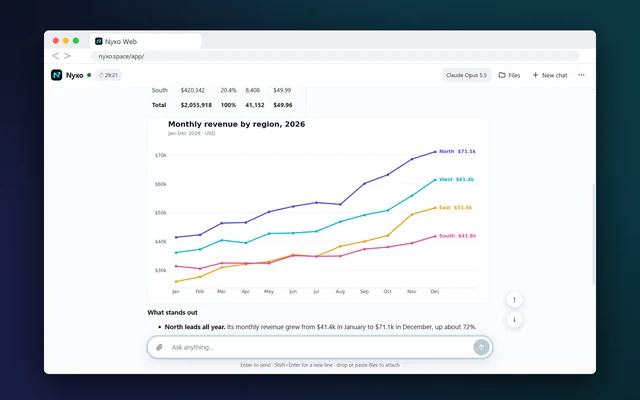
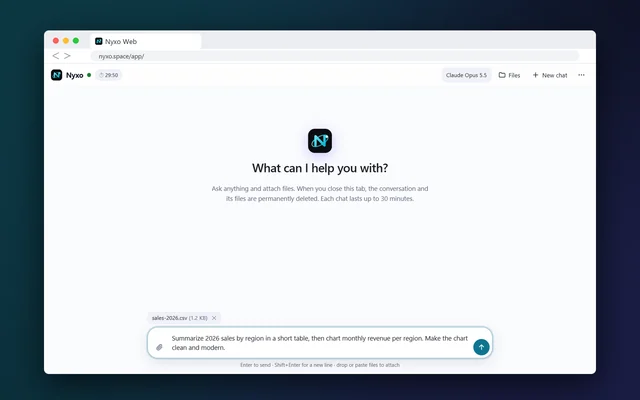
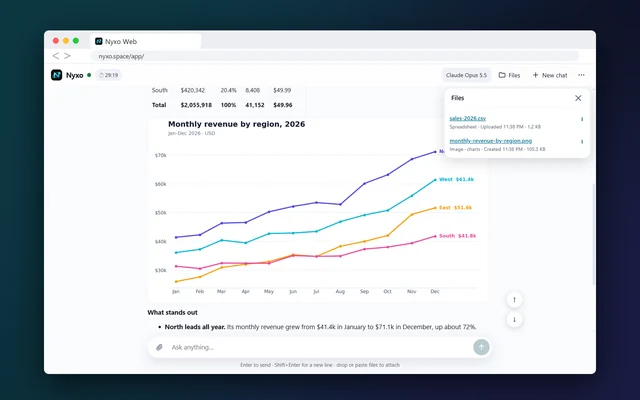
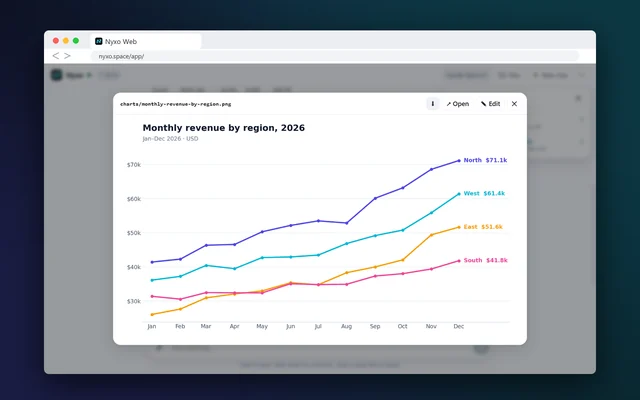
Prepaid credit lasts 365 days from activation or until spent. Monthly access lasts 30 days with a daily allowance.
Prepaid top-ups add credit and 365 days from the later of expiry or payment. Monthly renewals add 30 days to the same tier and daily allowance; early renewal does not reset current usage. After expiry, a new 30-day period starts at renewal.
Each request uses balance by its tokens, at the model’s list price. Bigger requests cost more.
It is hidden while you paste it, never put in a web address, and logout removes it fully. Never share it: anyone with it can spend its balance.
Pay in USDT. We never ask for a card, bank details or ID.
Our Terms apply to every key. Keys used against our usage rules can be blocked.
Read the TermsA prepaid or monthly key that lets Claude Code and VS Code use Claude Opus 5.5, Claude Sonnet 5.5, GPT-6 Astra and Gemini 4 Argon. Pay in USDT for prepaid credit or a 30-day daily allowance.
Yes. Windows, Mac and Linux each have a one-line login and logout command, and a ready setup file on the My key page.
Run the logout command for your computer (shown in Setup), or use the logout file from the My key page. It removes the key fully. Then close and reopen your terminal and VS Code.
In Claude Code or the VS Code panel, type /model followed by the name, for example /model gpt-6-astra. In your own code, change the model field.
Open the My key page and paste your key. You see what is used and left, and when the key expires. Running the login command again shows it too.
Prepaid credit lasts 365 days from activation or until spent. Monthly access lasts 30 days with a daily allowance. Monthly: 30 consecutive 24-hour allowance windows from activation. Unused daily allowance does not roll over. Renew manually in USDT; no automatic billing. Prepaid and monthly access use separate keys.
Choose the matching option above, select “Top up / renew” and paste your key. Prepaid top-ups add credit and 365 days from the later of expiry or payment. Monthly renewals add 30 days to the same tier and daily allowance; early renewal does not reset current usage. After expiry, a new 30-day period starts at renewal.
In USDT on BNB Smart Chain (BEP20). Each order gets its own address. Send the exact amount within 15 minutes; your key appears on the payment page once the payment is confirmed.
The login hides your key while you paste it and saves it only on your computer. The My key page never puts it in the address bar and never stores it. Never share your key or put it in public code.
Your key is shown on the payment page for 7 days after payment. Save it somewhere safe. After that, contact us with your order ID.
Yes. Nyxo Web Chat works in your browser for free, with no key and no account.